Log in and choose an editor
Purpose
Sign in to the correct SeattleOnABudget website and choose the editing area that owns the content. This prevents a routine article edit from accidentally changing a site-wide template.
Required role
- Author: create and edit assigned posts; publication rights depend on the account configuration.
- Editor: manage posts and ordinary pages.
- Administrator: access configuration and Divi Theme Builder. Client users should still escalate global-template changes unless a maintainer has approved the exact procedure.
Prerequisites
-
Use Chrome for the normal WordPress block editor (Gutenberg), including article text, Image blocks, captions, and draft saves. Keep Gutenberg as the article editor. Use Divi Builder for pages already built with Divi; those pages can be opened in Chrome. Keep each item in its existing editor.
-
Use the private login address and credentials supplied through the approved secure channel. This handbook never contains passwords or recovery codes.
- Use the website dashboard address supplied to you. Confirm the site name before editing. Practice on a new unpublished draft; review changes before updating any published item.
- Know the expected result and the page or post title before opening an editor.
Screenshots focus on the editing controls. Nonessential details may be hidden for privacy.
Steps
- Open Chrome and visit the website dashboard.
Confirm the address is seattleonabudget.com before signing in.
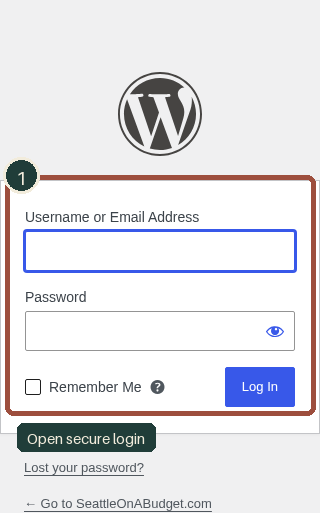
- Enter your assigned username and password, then select Log In.

- After signing in, confirm the website hostname again and check the dashboard navigation before opening content.

- Select Pages for a fixed destination such as Home, Advertise, a pillar landing page, or another standalone information page.

- Select Posts for an individual blog article or dated editorial item.

- On a narrow screen, select the menu icon to reveal the dashboard navigation.

- Select Pages or Posts from the expanded mobile menu using the same ownership rule above.

Expected result
You are signed in to the intended website and have opened the correct content list. No content has been changed merely by reaching that list.
Common mistakes
- Editing a published item when only draft preparation was approved.
- Treating the Home page's dynamic article tiles as ordinary inline text.
- Opening Divi Theme Builder for a normal blog-post change.
- Assuming a header, footer, search result, 404 page, or blog template is owned by the page currently visible on the public site.
Recovery or escalation
If the text is not present in the selected Page or Post editor, stop. Check Global Site Areas and Troubleshooting before changing another item. If the content belongs to a global header, footer, Theme Builder body, dynamic listing, helper, or plugin configuration, ask a maintainer to perform or approve the change.